Project Overview :
● NumPy is an essential module for carrying out data science operations efficiently.
● NumPy stands for Numerical Python.
● SciPy is a scientific computation library that uses NumPy underneath.
● SciPy stands for Scientific Python. Mode refers to the most repeating element in the array, we can find the mode from the NumPy array.
Syntax : scipy.stats.mode()
Requirements :
● Python
● VS code
● Library – numpy and scipy
Code :
  import numpy
from scipy import stats

Speed = [99,86,87,88,86,86,103,87,94,78,77,85,86]
x = stats.mode(Speed, keepdims=True)

print(x)
Code Explanation :
● import numpy -- import numpy as np and use it in python. In command prompt or VS code terminal run the below pip command to install numpy library,
● pip3 install numpy
● from scipy import stats -> import scipy and use it in python. In command prompt or VS code terminal run the below pip command to install scipy library,
● pip3 install scipy
● Speed = [99,86,87,88,86,86,103,87,94,78,77,85,86]
● x = stats.mode(Speed, keepdims=True) -> scipy.stats.mode(array, axis=0) function calculates the mode of the array elements along the specified axis of the array (list in python).
● Keepdims : Boolean, if set to True, the axis is retained with size one, and the result will broadcast correctly against the input array.
● print(x)
● Run the code.
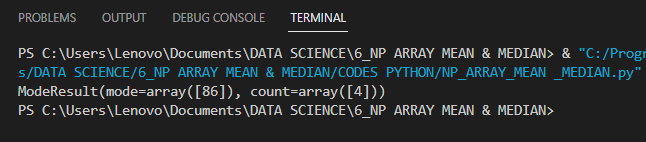
Output :
●After running the code, output of the terminal as given below,